
The Agent Says “Done” — Sorry, It’s Lying to You
Published:
Also available as the original Chinese article.

It is almost time to leave work. You hand a stubborn bug to your coding agent: “Fix this, run the tests, and make sure it works.” A few minutes later, it lists the files it changed and reports: “Fixed. All tests passed.” Relieved, you open the page and try it. The same error appears again.
Now you are back in the logs. Did it edit the configuration the application actually uses? Did the tests run? Did any of them cover this error? The time you hoped to save goes into questions and another round of debugging. And the next time it says “done,” you wonder whether you can trust it.
If you use agents to write code or change configuration, this gap may feel familiar. The agent has done real work and given a detailed report, but the steps still need to be checked against your request. A command finishing successfully establishes that it ran; completing the task also depends on the right target, the required checks, and a result that meets your requirements.
The agent may have misunderstood the goal or stated an unverified result too confidently. Asking it for another assurance leaves those questions unanswered. You need records you can inspect: what changed, what was checked, and what remains unconfirmed.
This is the problem dsh-completion-guard addresses. In DeepSeek Harness (DSH), it saves task requirements and checks them against tool results. For work it can verify, it produces a “completion certificate” that records the evidence behind the conclusion.
Execution Ended. The Task Did Not.
Consider a task with four clauses: change only project A’s configuration file, set activation to always, run the project’s self-check, and read the configuration back to confirm the persisted value.
Several wrong outcomes can still contain a successful tool result:
- the right field was changed in project B;
- project A was changed, but the required self-check never ran;
- the check passed against stale state;
- the write succeeded, but no independent readback followed;
- every step happened before the contract was revised, so the evidence is now stale.
The agent does not have to be deceptive for this to happen. More often, it mistakes “I performed a plausible sequence of actions” for “the task is complete.” The approximation becomes more dangerous when a task spans many turns, revisions, resumptions, or context compactions.
Making “Done” Something You Can Check
dsh-completion-guard turns a task into a checklist: what to do, what to leave alone, and what counts as finished. It also keeps a record of later changes to those requirements. After a conversation is compacted or resumed, the agent can still recover the current checklist.
DSH uses its existing tools to edit files, run tests, and execute Git commands. Guard checks the saved calls and results: was it the requested file, was it the required test, and did the result come from this operation? If the request includes reading the file again after an edit, Guard also checks that this happened and that the contents match the requirement.
If you ask to “run the test and report the result,” a test that actually finishes, followed by an honest report of failure, can satisfy that request. If you ask to “fix it until the test passes,” it must pass. When a file is already edited but has not been read back, the next step is to check it, not edit it again. These judgments apply only to tests and file operations the plugin supports.
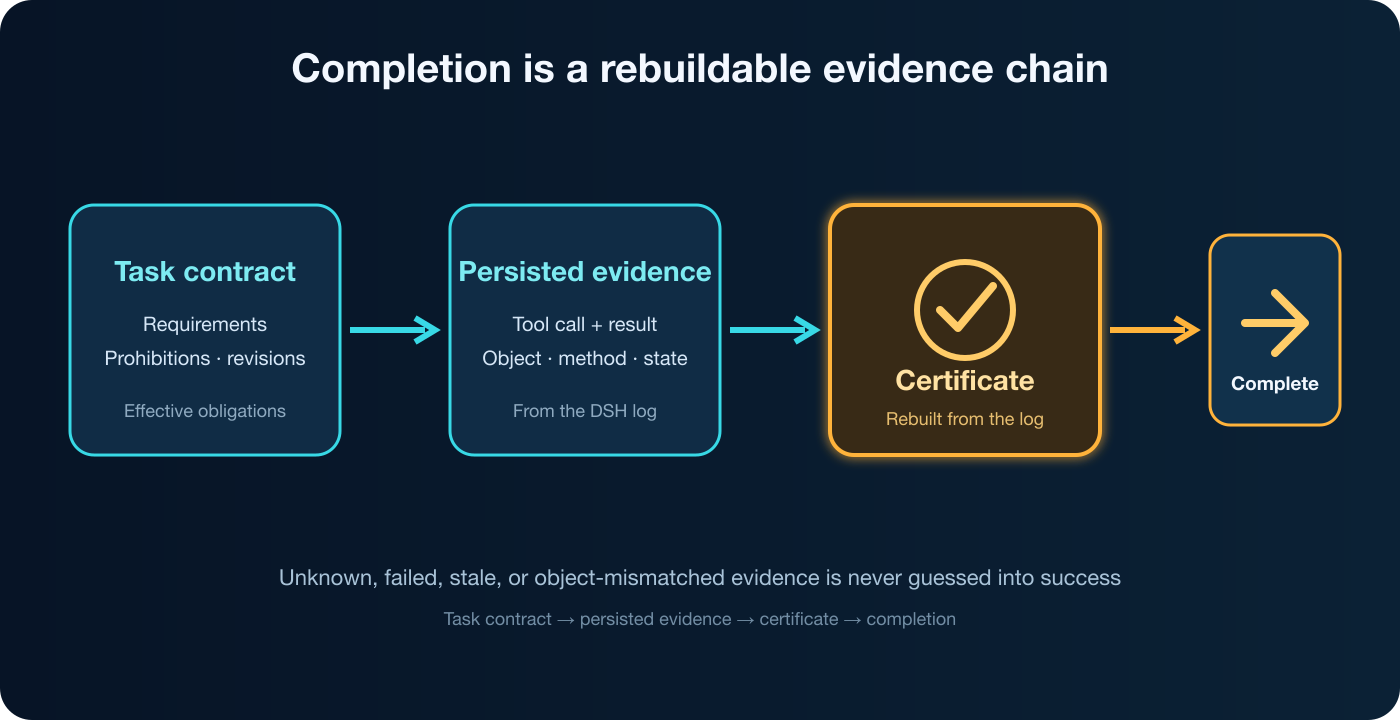
The flow can be reduced to four questions:
- What are the currently effective requirements?
- Which operation results were actually persisted in the DSH session log?
- Does each result prove the corresponding requirement?
- Can the certificate be derived again from that log?
A completion certificate must remain verifiable from saved records. If those records no longer support it after a session resumes, the previous “complete” conclusion cannot stand. The diagram shows this certification process. For an investigation or explanation it cannot certify, the agent can still answer honestly and explain what remains unverified.
Integrating with DSH Without Taking It Over
DSH still owns Goals, Todos, session resume, compaction, permissions, and tool execution. dsh-completion-guard leaves those facilities unchanged; its scope is completion certification, not sandboxing.
Guard rebuilds the checklist from session records and checks the evidence before deciding whether the task can be marked complete. To have it check completion of a DSH Goal, run /context-guard on in a new session. Automatic requirement recording does not enable that check. It covers only the completion entry points connected to the plugin, not every internal change DSH can make to Goal state.
Requirements and tool results come from session records. If you also enable release or restart protection, those operations leave separate private records; preserve them along with the session. Missing or damaged records prevent the plugin from confirming the affected operation. Enabling protection does not authorize new actions on the user’s behalf.
For “explain this configuration, then edit the file and run the test,” finishing the explanation leaves two jobs to do. “Continue” means advancing the current work that is ready, not creating a new task. Benefits that need long-term observation can be described as such, but a test requested now cannot be skipped by calling it future work.
An Independent DSH Implementation
The project ports the deterministic task-contract and completion-certification ideas from Codex Context Guard, but it is not the Codex plugin under a new package name.
Codex and DSH save conversations, call tools, and load plugins differently, so the DSH plugin has its own TypeScript implementation. The projects share some task-checking rules and use common cases to compare their results. That does not establish identical behavior across every tool or operating system. Installation, caches, and releases remain separate.
How to try it
Before installing, check your environment against Compatibility and consult the latest release. If you use the DSH web interface, install the plugin into its Web configuration:
dsh plugin --profile web add dsh-completion-guard
After installation, follow the quick start to check the “host lock,” which ties the plugin to your actual DSH installation and configuration. The result must say supported; a command finishing without an error is not enough. Back up configuration before changing it, and follow the documented setup and restart order. Then run these controls in the target session:
/context-guard on
/context-guard status
The default opt-in mode requires you to enable protection in each session. The always mode starts recording requirements with the first message, including an image-only or attachment-only message, and leaves an empty session untouched. Start with the default, use status to check activation, and use diagnose to see which requirements still lack evidence.
If you installed the former package, dsh-context-guard, do not load it alongside the new one. Before upgrading, check Compatibility for handling existing sessions and records. The release annexes describe what was verified on each platform. Passing automated tests, installing successfully, and loading the plugin into a running DSH instance are different checks.
Scope of Use
dsh-completion-guard is useful when a task can be expressed as an explicit contract and checked deterministically from tool results: named file edits, required tests, build artifacts, Git state, or independent readback. Its value grows with long tasks, many requirements, and workflows likely to cross resume or compaction boundaries.
Whether code meets business needs, a research conclusion holds, or a design looks good still requires appropriate testing and human judgment. Compatibility lists the operations the plugin can check. For example, proving a file was created also requires evidence that it did not exist beforehand. Finding plugin files in an installation directory does not prove the plugin is active.
Guard keeps requirements and the records needed to check them. It does not copy full conversations, tool output, or file contents, and does not store credentials or image data.
Guard adds a check behind “done”: provide matching records for what can be verified, and explain the results and limits of what cannot.