
AI agents have taken off over the past couple of years, but plenty of people still stumble on their first attempts. How do you phrase a prompt? How do you build a workflow and then improve it? Most of it is trial and error. Newcomers know the feeling: you polish every word, watch the agent think carefully and get on with the task, and only at the end realize the result is far from what you wanted. One or two such failures might just be the model having an off day. When the same problem shows up across dozens of sessions, the workflow is what needs adjusting. A random mistake in one session is hard to trace to its source; only by looking at a stretch of sessions together do the stable patterns surface.
Claude Code’s built-in /insights exists for exactly this. It analyzes recent local sessions, summarizes the kind of work you’re doing, the requests that tend to get misunderstood, and where defective code keeps appearing, then suggests how to use Claude Code more effectively and produces an HTML report. Per the official docs, it processes up to 200 previously unanalyzed sessions at once. Put simply, it tells you which problems keep coming back and what you can change next.
One user found that the report surfaced habits he had not noticed: guessing at APIs instead of checking the docs on similar UI tasks, small requests growing into large diffs, and verification steps getting skipped. None of it looked remarkable on its own, but lined up across dozens of sessions it was enough to push him to edit CLAUDE.md, add verification rules, and reorganize his sessions. Atomic Object published a write-up of exactly this kind of case. The point of reviewing session history is to make every future task run more effectively.
Recently DeepSeek shipped its own Harness (DSH). It is a modular, minimalist framework that is still, to put it mildly, in its early days, so there is naturally no /insights-style capability. Claude Code’s native /insights also has limits: mixing unrelated projects can dilute the conclusions, the sample size shapes the final picture, and the suggestions have to be checked back against the original sessions. People in the Claude Code community have asked for per-project scoping (relevant issue). Tools that deliver session statistics and summaries exist, but they do not answer what this work actually delivered and what evidence stands behind it.
So I built dsh-session-insights for DeepSeek Harness. Run /session-insights and it filters sessions by project and time, marks the places where work repeatedly got stuck, and links completed results back to their evidence. It then writes a local HTML dashboard and companion JSON. Deterministic mode runs fully offline. With semantic analysis enabled, only a bounded set of evidence processed by the selected privacy mode goes to DSH’s configured model provider. If that model is unavailable, the report says why it fell back.
What /session-insights gives you is an AI-workflow checkup: where you have been spending your agent, which practices are working, which problems keep recurring, and where the next rule, Hook, or Skill should start.
What you actually get in the report
The HTML dashboard organizes results from several angles: the work areas and tasks you have been handling, which workflows are most representative, where friction keeps recurring, which results carry evidence you can revisit, and what improvements could be turned into rules, Hooks, Skills, or Agents. The companion JSON keeps the structured results for scripts, comparisons, and other local workflows.
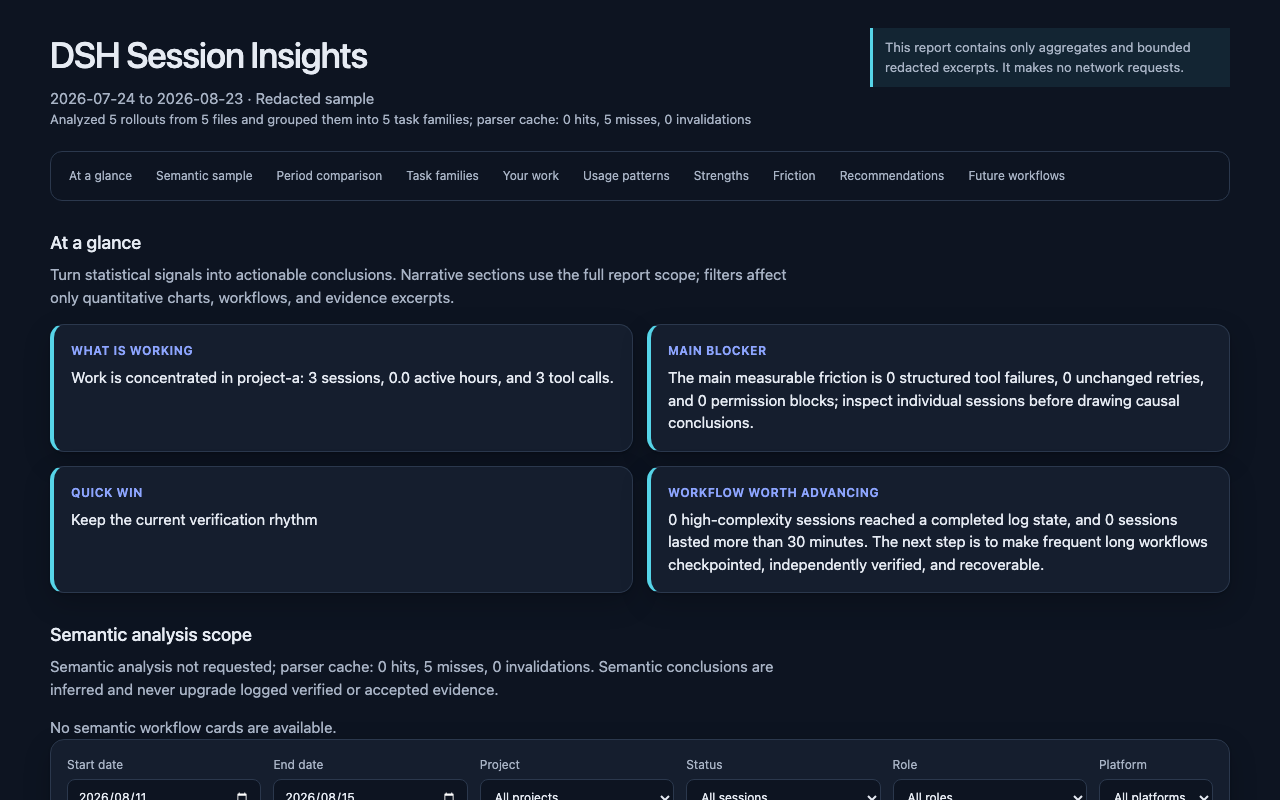
The analysis scope can be narrowed by time and by project, or compared across two periods. That way the report does more than answer what you did recently; it can also show whether the same friction decreased after you changed your rules. One skipped test can be carelessness. But if several projects across the past three weeks keep ending with work marked done and never verified, that looks more like a workflow friction that deserves a pre-completion checkpoint or a Hook.
/insights answers the question of what long-term patterns look like across sessions; dsh-session-insights goes further by making the analysis scope, evidence location, privacy mode, and fallback state explicit. Whatever the retrospective concludes, the results still have to be checked against the sessions and the project evidence.
Four questions make a retrospective reliable
Start with the objective and whether it changed during the session. A team can spend hours executing a goal that later instructions have already replaced.
Once the objective is clear, identify which results actually landed. A code diff, a generated file, a passing test, and a public URL mark different stages of completion and should be reported separately.
Then find where the work repeatedly slowed down. Retries, authentication switches, environment mismatches, and tool limitations often point to a process or tooling change more clearly than total elapsed time does.
Finally, state the verification scope of each conclusion. A native macOS result, a Windows CI result, and a native Windows result support different claims. The next decision depends on knowing which layer of evidence is available.
These four questions define the structure of a useful retrospective. A tool has to reconstruct changing objectives, landed artifacts, recurring friction, and evidence scope before its report can guide the next attempt.
How dsh-session-insights reconstructs those answers
dsh-session-insights is a local-first session-retrospective tool for DeepSeek Harness. It installs as a Bundle, the plugin package format used by DSH, and adds the /session-insights command. When the command runs, it obtains in-scope session snapshots through sessionQuery. This is the trusted query interface provided by Harness, so users do not have to copy a transcript by hand.
The rest of the pipeline maps those snapshots to the four retrospective questions:
- Harness queries the current in-scope snapshots and preserves the source of messages, tool results, and state changes.
- The snapshots move to the local analyzer as JSONL over standard input. JSONL stores one JSON record per line, while standard input lets the data flow between processes without writing another raw copy into the analysis directory.
- The analyzer uses an isolated workspace, or working directory, to identify work areas, outcomes, friction, representative workflows, and trackable recommendations.
- Model-generated semantic results must satisfy a structural contract that defines required fields and allowed values. Enum fields accept only the published choices. If the model is unavailable or its result is invalid, fixed local rules generate a deterministic report and record the fallback reason.
- The tool writes a self-contained HTML report. It retains evidence locators and opens as a single file without copying raw session snapshots into the insights workspace.
This pipeline makes the summary inspectable. Fluent model output enters the complete report only after its fields and values pass validation. A failed check produces a visible degraded result.
Your Privacy, Your Choice
Raw snapshots travel over standard input, reports are written locally, and no extra durable raw copy lands in the analysis directory. That data flow shrinks the copy surface, but the derived report can still contain sensitive details from the session.
The default redacted mode anonymizes identity and paths and filters common secrets; the metrics mode keeps no session excerpts. Still, no automatic processing should count as true de-identification, so review the HTML before sharing it.
Model-assisted analysis can also be absent. When no model is configured, a call fails, or the output violates the structural contract, the report records the reason and switches to deterministic analysis. Users can see that fallback and judge how much semantic interpretation the report provides.
Try it once
If you already use a DeepSeek Harness Web profile, install the npm Bundle directly:
dsh plugin --profile web add dsh-session-insights
dsh web
Then run this in a session:
/session-insights
The project also keeps standalone Python CLI and Skill entry points for workflows that do not run through the Bundle. See the repository documentation for current commands and compatibility notes, and GitHub Releases for the latest artifacts and checksums.
Where to get it
The direct installation channel is npm, while the GitHub repository remains the source of record for code, release notes, and checksums. dsh.pub also has a public entry with an install command pinned to a specific source commit.
The project is also listed in several community directories: awesome-dsh-plugin (with a storefront page on awesome-dsh-plugin.com and the in-app plugin market), the dsh-market.com workshop, and the dshworks awesome-dsh-plugins registry.
Where it fits
It is especially useful once you have accumulated a stretch of sessions, when the agent seems to keep reworking things and you cannot say why, when you are about to adjust AGENTS.md, a Skill, a Hook, or the way tasks are split, or when you want to compare whether the same friction decreased after a workflow change. Release preparation, cross-platform validation, research organization, and multi-stage implementation all fit, because their value is spread across many decisions and pieces of evidence and the last reply cannot represent the whole job.
dsh-session-insights offers retrospective leads, while project acceptance still belongs to code, tests, native environments, and public readback. The report helps you locate claimed results, the evidence behind them, and where work kept getting stuck.
The published Bundle has separately scoped native macOS and Windows acceptance, plus CI coverage on Ubuntu, macOS, and Windows. Each result keeps its own evidence scope. The candidate acceptance record lists the remaining unverified boundaries.
After a stretch of AI sessions, a retrospective should leave three things you can keep using: the artifacts that landed, the evidence behind each conclusion, and the workflow changes worth trying next. /session-insights gathers those scattered clues across many sessions into one report so you can check each one against the original evidence.