
If you use Codex on only one computer, configuration is usually not a problem.
Over time, however, the setup grows. You configure frequently used MCP servers, install plugins, maintain named profiles for different kinds of work, and accumulate your own skills. When you move to another computer, a fresh Codex environment often means finding those settings again, changing paths, installing tools, and trying to remember how the original machine was configured.
The problem becomes harder when a macOS configuration cannot be copied directly to Windows, and a server differs from both personal computers. Copying the entire ~/.codex directory looks convenient, but it may also move tokens, OAuth state, conversation history, caches, and machine-specific paths. Overwriting configuration through Git can instead break an environment that already works on the destination machine.
What I wanted was simple:
Maintain one personal Codex configuration that works across macOS, Windows, and Linux. Preview every change before applying it, avoid overwriting local modifications, and keep private runtime state on each machine.
That led me to open-source codex-profile-sync.
It is a cross-platform configuration synchronization tool for Codex. It safely applies a private, portable Codex profile to different computers and currently supports macOS, Windows, and Linux.
Project: https://github.com/GreenLv/codex-profile-sync
Current status: Alpha; see the latest release
1. What problem does it solve?
codex-profile-sync is intended for situations such as these:
- you use Codex on both work and personal computers;
- your machines run macOS, Windows, or Linux;
- you maintain MCP configuration, plugin preferences, named profiles, or skills;
- you want to keep personal configuration in a private Git repository without uploading private runtime data;
- you do not want a synchronization tool to overwrite existing local configuration silently;
- you do not want to rebuild your environment from memory whenever you change or reinstall a computer.
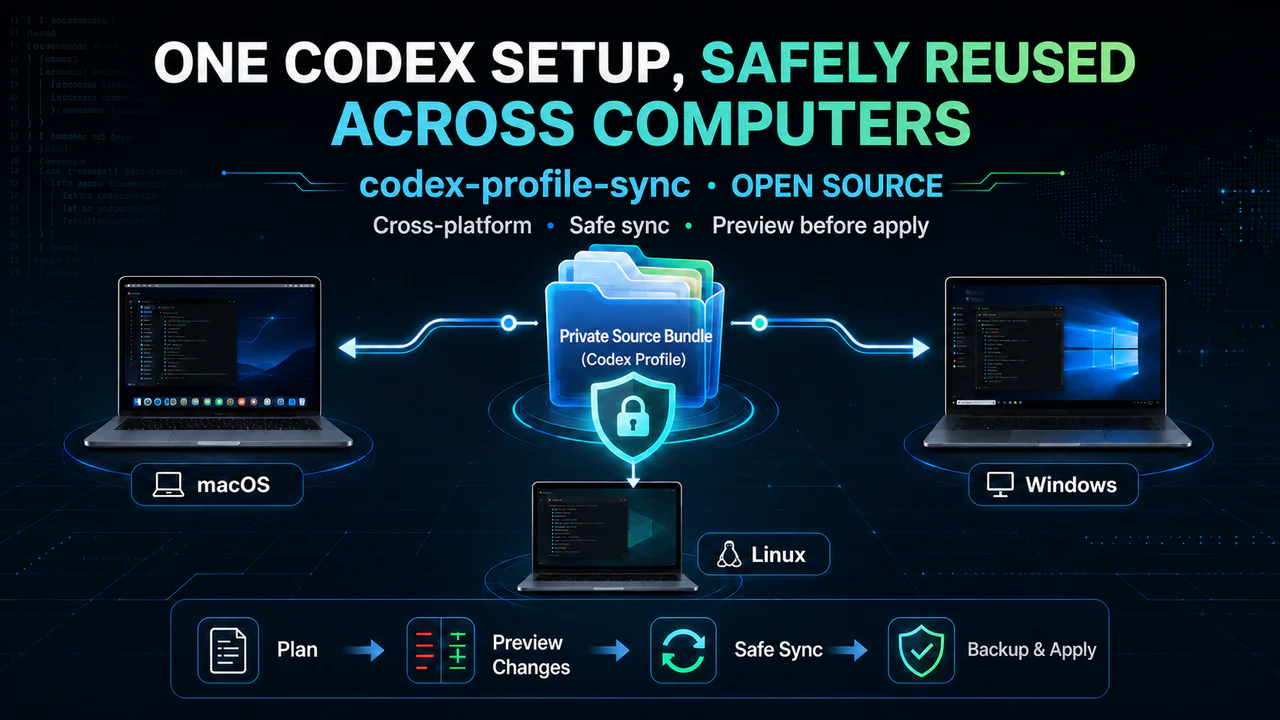
With the tool, you maintain one private Source Bundle. Each device retrieves that bundle, previews the changes, and then applies them locally.
Private Source Bundle
        |
        +----> macOS
        +----> Windows
        +----> Linux
The bundle can contain configuration shared by all three platforms as well as small operating-system-specific differences in paths and commands.
2. Why not synchronize the entire .codex directory?
The local Codex directory contains more than configuration that you intentionally authored. It also contains login state, sessions, history, logs, caches, memories, and other machine-generated data.
That data should not be copied wholesale, and it should not be committed directly to GitHub.
codex-profile-sync therefore separates the synchronization workflow into three layers:
- The public synchronization engine: this project, including its code, documentation, and tests.
- A private Source Bundle: only the portable configuration that you explicitly select.
- Local Codex state: login information, history, caches, and similar data that always remain on the current machine.
In short:
The tool does not upload your complete Codex directory to the cloud. It manages only the configuration that you explicitly declare.
The currently supported content includes:
- explicitly declared settings from
$CODEX_HOME/config.toml; - Codex named profiles used for different tasks;
- user skills under
$HOME/.agents/skills(optional and disabled by default).
Tokens, OAuth state, session history, logs, databases, caches, memories, plugin caches, and other runtime data are outside its scope.
3. The features I care about most
3.1 Preview the plan before applying it
The tool does not immediately change the configuration. Every synchronization can begin with plan, which shows which files would be created, updated, or deleted and reports any conflicts.
codex-profile-sync plan --source "$HOME/private-codex-profile"
For configuration synchronization, I would rather know what will happen first than discover a problem after the operation has finished.
3.2 Do not overwrite local files casually
If a same-named file already exists on the destination machine but is not owned by the current profile, the tool refuses to overwrite it.
If a synchronized file is later modified locally, the next update becomes a conflict that requires a user decision instead of silently replacing the local version.
3.3 Support shared configuration and platform differences
macOS, Windows, and Linux can share one common configuration while maintaining small platform overlays.
For example, an MCP server may use the same configuration logic on all three platforms while differing only in its Python or executable path. The overlay records only that path difference rather than duplicating the complete configuration three times.
3.4 Recover from write failures
Before applying configuration, the tool backs up existing files and writes updates through atomic replacement. If a multi-file operation fails partway through, it attempts to restore the destination files that have already changed.
It also rejects symbolic links, path escapes, and protected Codex runtime settings.
3.5 Keep the boundary explicit
codex-profile-sync only applies a Source Bundle that already exists locally to the Codex environment. It does not automatically run git pull or git push, install plugins, complete MCP login, or initiate network requests.
Git transports the private configuration between devices. codex-profile-sync applies that configuration safely on the local machine. These are separate responsibilities.
4. Quick start
The project requires Python 3.11 or later.
First, install it from PyPI:
pipx install codex-profile-sync
Or use uv:
uv tool install codex-profile-sync
Then create a private Source Bundle outside the public engine repository:
codex-profile-sync init "$HOME/private-codex-profile"
Edit the shared configuration, platform configuration, profiles, and optional skills as needed. Then run:
codex-profile-sync plan --source "$HOME/private-codex-profile"
codex-profile-sync apply --source "$HOME/private-codex-profile"
codex-profile-sync doctor --source "$HOME/private-codex-profile"
These commands serve three different purposes:
planpreviews changes and conflicts without modifying files;applyapplies the configuration after confirmation;doctorchecks whether the current machine matches the Source Bundle.
To share the configuration across computers, place private-codex-profile in a private Git repository. On another machine, retrieve that repository and run plan -> apply -> doctor again.
For the complete Source Bundle format, platform overlay behavior, and configuration allowlist, see the project’s English README.
5. Who is it for?
If you have just started using Codex, work on one computer, and maintain only a few configuration lines, you may not need this project yet.
It becomes more useful when your Codex workflow includes:
- multiple MCP servers;
- named profiles for different tasks;
- skills that you write or maintain over time;
- different command paths across macOS, Windows, and Linux;
- a personal Codex environment that you want to preserve and evolve.
In that case, codex-profile-sync can turn configuration scattered across several computers into a personal asset that can be reviewed, migrated, and recovered.
6. Current status
codex-profile-sync is currently in Alpha, is available from PyPI, and supports cross-platform application of base configuration, named profiles, and optional skills, together with change previews, conflict detection, backups, and recovery from failed writes.
The Source Bundle schema is versioned. Before 1.0, the CLI may continue to add safe, backward-compatible checks.
I want the project to remain small and focused. It does not try to take over the complete Codex runtime; it focuses on safely reusing personal configuration across devices.
7. Summary
The central idea behind codex-profile-sync is:
Use a public synchronization engine to manage a private Codex Source Bundle, and safely apply only the configuration explicitly declared by the user to the current machine.
If you use Codex across several devices or maintain profiles, MCP configuration, and skills, you are welcome to try it:
GitHub: GreenLv/codex-profile-sync
If the project is useful to you, consider starring it, opening an issue, or contributing an improvement. I would also be glad to hear about the problems and missing scenarios you have encountered while using Codex across devices.